

Now Reading: The Samsung Galaxy S26 Camera Is a Photography Nightmare: Here Is Exactly What Went Wrong
-
01
The Samsung Galaxy S26 Camera Is a Photography Nightmare: Here Is Exactly What Went Wrong
The Samsung Galaxy S26 Camera Is a Photography Nightmare: Here Is Exactly What Went Wrong

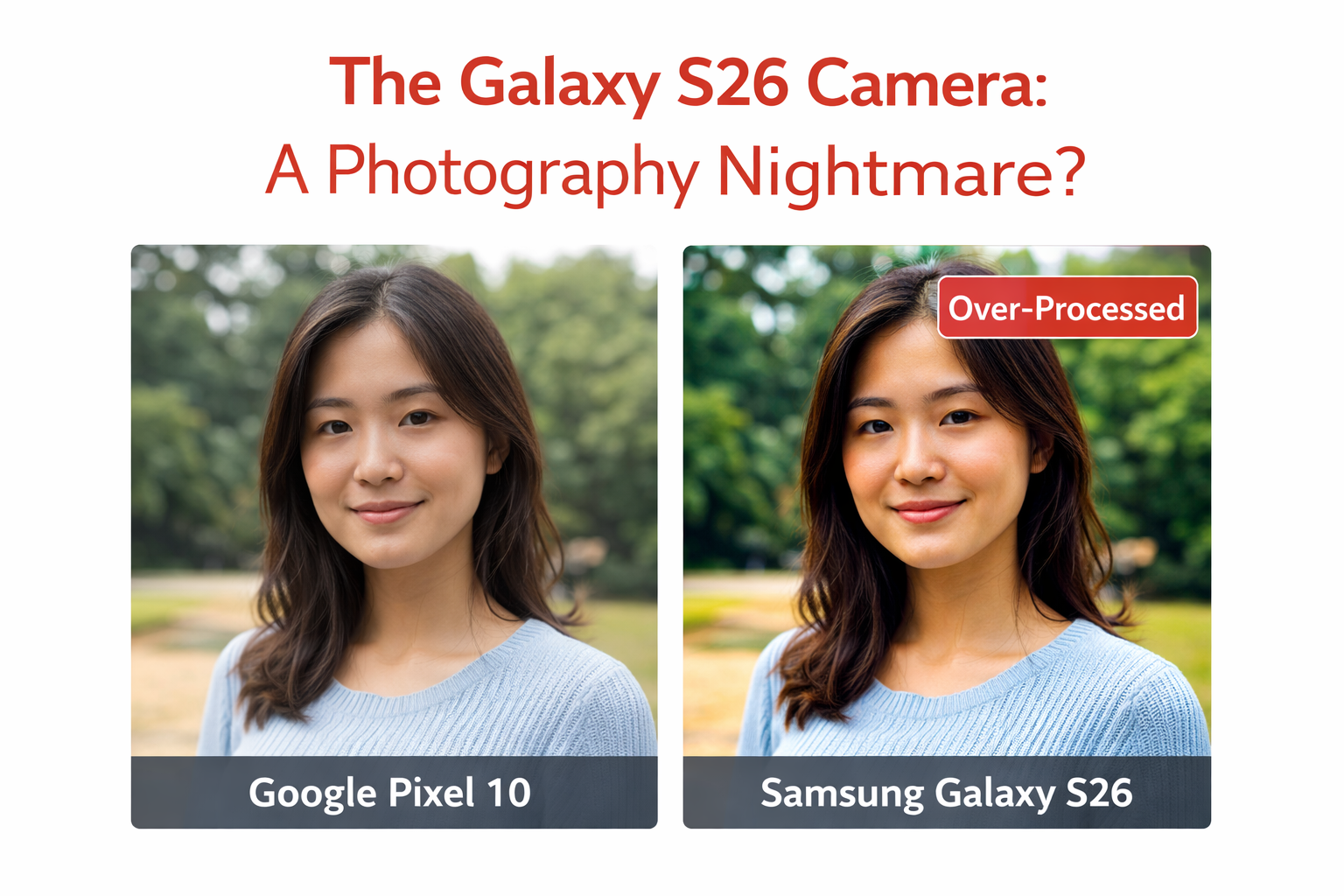
Samsung makes some of the most technically impressive smartphone cameras in the industry. The Galaxy S line’s camera hardware, sensor size, optical zoom range, and aperture specifications consistently rank at or near the top of any objective hardware comparison. So when photography reviewers, podcasters, and camera enthusiasts start calling the Galaxy S26’s camera a nightmare, it is worth understanding precisely what is being criticized and whether the criticism is fair.
Thank you for reading this post, don't forget to subscribe!The Galaxy S26 has not failed at photography hardware. It has failed at computational photography philosophy: the AI and software processing decisions applied to photos after the image data is captured. And that failure mode is, in some ways, more frustrating than a hardware failure because it is a choice.
What Computational Photography Actually Does
Every modern smartphone camera applies significant software processing to images before saving them. The optical sensor captures raw image data, and then the camera software makes decisions about sharpness enhancement, noise reduction, dynamic range expansion, color rendering, skin tone processing, texture detail, and dozens of other parameters that determine how the final image looks.
In the best implementations, this processing is invisible: the resulting photo looks like a great photo taken with a great camera. In the worst implementations, the processing becomes visible as artifacts: unnaturally smooth skin, over-sharpened edges with halos, color saturation that makes scenes look painted rather than photographed, and texture detail that looks like AI hallucination rather than optical capture.
What Specifically Is Wrong With Galaxy S26’s Processing
The Over-Sharpening Problem
The most frequently cited issue with Galaxy S26 photos is aggressive sharpening that creates visible edge artifacts and a texture quality that looks artificial on close inspection. Reviewers posting 100 percent crop comparisons with Pixel 10 and iPhone 17 photos consistently show the Galaxy S26 adding edge halos and artificial micro-texture that is not present in the original scene.
This over-sharpening is particularly problematic in portrait shots, where skin texture is rendered with an artificial crispness that looks more like an AI-generated image than a photograph. Professional photographers and advanced amateur photographers who print or crop their photos aggressively find this artifact deeply unsatisfying.
Aggressive HDR Processing
The Galaxy S26’s HDR (High Dynamic Range) processing is extremely aggressive in recovering both highlights and shadows in high-contrast scenes. While technically impressive in terms of the range of tonal information preserved, the result often looks tonally flat: scenes that would naturally have deep shadows and bright highlights are rendered with a uniform brightness distribution that removes the natural contrast that gives photos visual drama and depth.
This is a philosophical choice about what a smartphone camera is for. If you are shooting documentation photos, real estate images, or any use case where preserving detail in every part of the frame is the priority, aggressive HDR processing is an advantage. If you are shooting street photography, landscapes, portraits, or any context where the interplay of light and shadow matters aesthetically, it is a problem.
The Samsung Philosophy: Samsung’s camera processing is optimized to look impressive in quick casual viewing: bright, sharp, colorful, detailed everywhere. This is a legitimate consumer photography goal and serves the majority of Galaxy users well. The criticism from serious photographers is that this optimization produces images that do not hold up to scrutiny or serve creative photography goals.
Color Rendering: Punchy vs. Accurate
Galaxy S26 photos are visually punchy. Colors are saturated, skies are deeply blue, foliage is vividly green, and skin tones have a warmth that reads as attractive in casual viewing. Whether this color rendering is accurate to the actual scene is a different question.
In systematic comparisons with the Pixel 10 and iPhone 17, the Galaxy S26 consistently renders colors at higher saturation than the other devices. Whether this is better is genuinely a matter of preference. Professional colorists and photographers who plan to edit their photos in post will find the over-saturated starting point makes their editing more difficult. Casual shooters who share photos directly from camera to social media may prefer the more visually striking Samsung rendering.
What Samsung Gets Right on the S26
It would be unfair to characterize the Galaxy S26 as purely a camera failure. Several aspects of its camera performance remain genuinely excellent:
- Telephoto zoom quality: The S26’s 5x optical zoom produces cleaner results than most competing phones at equivalent zoom levels
- Video stabilization: Electronic and optical stabilization for video is among the best available on any smartphone
- Low-light video: The S26’s video in dim conditions is consistently good, with less noise and more detail than most competitors
- Expert RAW mode: Users who shoot in RAW format and process images themselves can extract excellent results from the hardware
- Zoom versatility: The combination of main, wide, and telephoto lenses gives genuine creative flexibility
The Fix: Will Samsung Address This?
Samsung has released firmware updates for previous Galaxy S models that modified their processing parameters in response to user and reviewer feedback. The S23’s camera processing was adjusted post-launch to reduce some of its most aggressive processing artifacts. A similar path is available for the S26.
The question is whether Samsung will choose to make those adjustments. The camera processing settings that frustrate serious photographers are the same settings that make casual photos look great on social media, which is how most Samsung users use their phones. Pulling back on aggressive processing to satisfy photographers might make the phone look less impressive to the casual buyers who represent the bulk of the market.
Should You Still Buy the Galaxy S26?
The Galaxy S26 remains an excellent smartphone with a highly capable camera system. The photography concerns are real and significant for a specific type of user: photographers who value accuracy, editability, and natural rendering over visual impact at a glance.
For the majority of smartphone buyers who want photos that look great on Instagram, share impressively in group chats, and work well for everyday documentation, the Galaxy S26’s camera will satisfy completely. The processing decisions that annoy serious photographers are exactly the decisions that make casual photos look great.
- Buy the Galaxy S26 if: You value vibrant, punchy casual photos, exceptional zoom range, and the Samsung ecosystem
- Buy the Google Pixel 10 if: You value natural-looking photos, accurate color rendering, and better-in-editing starting points
- Buy the iPhone 17 if: You value a balance of accuracy and visual quality with the best video processing in a smartphone
Bottom Line: The Galaxy S26 camera nightmare is real but narrowly defined: it is a nightmare for photographers who value accuracy and post-processing flexibility. For casual smartphone photography, it remains excellent. Samsung needs to offer a Pro or Natural processing mode that serves the serious photographer segment without changing what casual users experience. Until then, the divide between its camera hardware excellence and its processing philosophy will continue generating exactly this criticism.
Related: Google Pixel 10 vs Galaxy S26 Full Comparison | iPhone 17e Camera Review | Best Smartphone Cameras of 2025
Samsung Galaxy S26 official specs
Related Posts
Stay Informed With the Latest & Most Important News

Top News
- Google’s AI-Powered Workspace in Search Is Now Available to All US Users: Here Is What Actually Changed

- How Jeffrey Epstein Used Silicon Valley’s Network: What the Reporting on Reid Hoffman and Tech’s Elite Reveals
- Where to Preorder the iPhone 17E Right Now: Every Deal Ranked Before the March 11 Launch
- Google Apps Experience and Games Level Up: The Programs That Could Cut Your Play Store Commission Significantly

- Google Is Not Waiting for a Settlement: It Just Killed the 30 Percent App Store Fee Unilaterally











Advertisement